DIY Squarespace Template vs Custom Website Design: Comparing the Real Cost
The sticker price on a Squarespace template and the invoice for a custom build measure almost nothing about what either site really costs. Squarespace's built-in templates are free, premium designer templates run roughly $200 to $800, and fully custom design typically starts near $3,000 and climbs past $10,000 depending on page count, ecommerce, and copywriting. A $300 template that takes 30 hours to configure isn't a $300 project once your own time is counted against it. A $6,000 custom site breaks even after fifteen new bookings at a $400 client value, but pays for itself on the second booking at a $5,000 client value. Semi-custom design, where a designer reworks an existing template around a business's specific offers, often produces results close to full custom at a fraction of the price.
The sticker price on a Squarespace template and the sticker price on a custom build tell you almost nothing about what each one will cost you. A template you buy on a Sunday night and finish on a Wednesday is cheap. A template you buy on a Sunday night and still haven't launched by March is the most expensive website you'll ever own, because every unlaunched month is a month nobody could hire you.
So the real squarespace template vs custom website cost question isn't which line item is smaller. It's which one gets you to a site that books clients, and what you're paying in hours, revisions, and delayed income to get there. This piece breaks down both paths across price, timeline, ownership, maintenance, and the hidden costs nobody puts on the invoice, then gives you a decision framework based on where your business is right now.
Squarespace Template vs Custom Website Cost: From Free to Thousands, With Custom Design Starting at $3,000
Here's the plain shape of the market as of this writing. Ranges, not promises, because pricing shifts by designer, region, and scope.
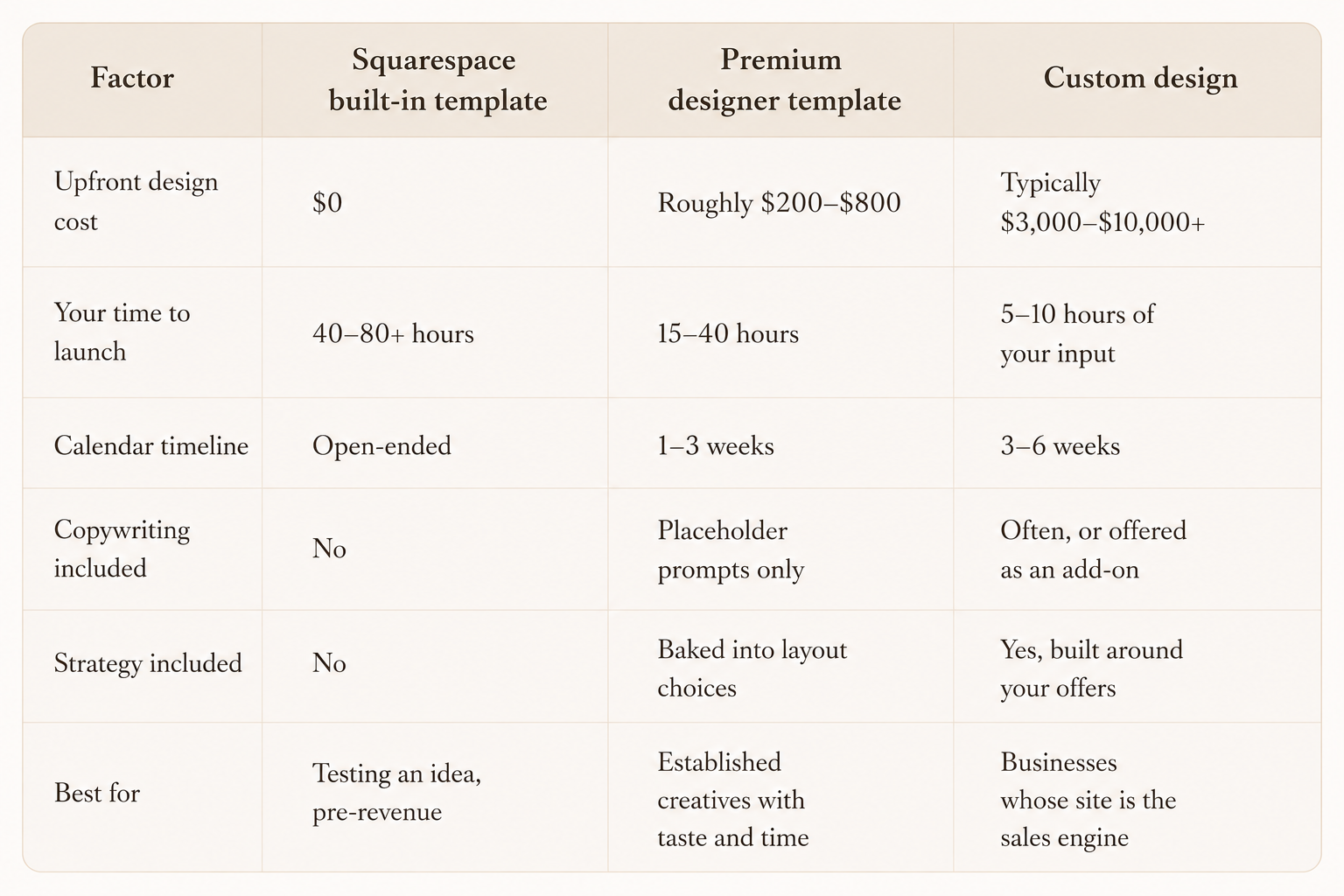
Notice the middle column. That semi-custom lane is where most working creatives land, and it's the option almost nobody in the search results explains properly.
Four different products all wear the name Squarespace website
Four things get called "a Squarespace website" and they are not the same purchase.
Squarespace's own templates come free with your subscription. They're clean, structurally sound, and deliberately neutral, because they need to work for a bakery and a law firm and a ceramicist. Neutral is the cost. You get a well-built empty room with white walls and a decent floor plan.
Premium designer templates are what independent studios build and sell. These arrive with layouts already composed, color palettes chosen, fonts paired, section rhythms worked out, and content prompts written into the placeholder copy so you know what belongs where. A well-made one is a finished interior. You're swapping in your own photos and words, not deciding whether the hero section should be full-bleed or split.
Semi-custom means a designer starts from an existing template and reworks it for you: your brand colors and fonts installed properly, your services restructured, sometimes a new page or two designed from scratch. Faster than custom, more personal than DIY.
Fully custom starts with your business, not a layout. Strategy first, then wireframes, then design, then build. Every page is drawn around what you sell and how you sell it. Nothing is inherited.
The gap between those four options is where the cost differences live, and it's mostly a gap in how many decisions someone else has already made for you.
Every path includes a Squarespace subscription fee
Whichever route you take, you're paying Squarespace to host the thing. Their plan structure runs from a basic site tier up through commerce tiers, and the commerce tiers remove the transaction fee that applies on the lower tier. A custom domain is usually included free for the first year and renews annually after that. Check squarespace.com/pricing for the current plan names and rates, since they change and stale numbers help nobody.
A few costs ride alongside the subscription regardless of template or custom:
Domain renewal after year one, typically in the twenty-dollar-a-year neighborhood
Professional photography, which for a creative business is not optional and often outweighs the design cost
Third-party fonts if your brand uses licensed typefaces beyond Squarespace's library
Scheduling, email marketing, or client gallery tools that live outside the platform
Copywriting, whether you pay for it or pay for it in your own weekends
There's a fuller accounting in the full Squarespace cost breakdown if you want the line-by-line version. The short story: the platform fee is the smallest number in this whole conversation, and it's the one everyone fixates on.
Premium templates demand 15: 40 hours of your labor to fit your business
Say you buy a premium template for $300. You open it Friday night with a glass of wine and a folder of photos. The design looks exactly like the demo. Gorgeous.
Then you start swapping. Your photos are vertical where the demo used horizontal. Your service names are three words longer than the placeholder text, so the button wraps awkwardly on mobile. Your logo is dark navy and the template's hero image is dark navy. Suddenly you're in the color panel at eleven at night trying to remember which section theme controls the footer.
This is normal. It's also where the real cost of the DIY route lives. A good premium template compresses that friction dramatically, because the hard decisions are pre-made, but it can't make decisions about your content for you. Budget somewhere between 15 and 40 hours if you're reasonably capable and your brand assets are already sorted. Put your own hourly rate against that number. If you charge $150 an hour for photography and you spend 30 hours on the site, the $300 template just became a $4,800 project in opportunity cost.
That math flips entirely if you're pre-revenue, between seasons, or simply enjoy the tinkering. Some people find the building part restorative. Not everyone is losing money by spending a slow February on their website.
Where templates win outright:
You keep the keys. Every future edit is yours to make at midnight with no invoice and no waiting.
The design floor is high. A premium template from a studio that designs for your industry already knows where a portfolio grid belongs and how an inquiry page should be structured.
Low risk. If the business pivots in eight months, you're out a few hundred dollars, not a few thousand.
You learn the platform. That knowledge compounds and makes you a better client later if you do go custom.
Where they cost you: the template can't restructure your offers, write your headlines, or tell you that your pricing page is buried three clicks deep. It hands you a strong container. The strategy stays your job.
Custom Squarespace design typically runs $3,000 to $10,000
Custom design from a freelance designer or small studio generally sits between $3,000 and $10,000, with plenty of work happening above and below that band. The spread confuses people, so here's what moves the number.
Page count, ecommerce complexity, and custom code drive pricing upward
Page count. A five-page service site and a twenty-page site with a blog, shop, and eight location pages are different projects entirely.
Ecommerce. Product templates, variant setup, shipping rules, checkout styling. Each one adds hours.
Custom code. Scroll-triggered animations, custom cursors, bespoke hover states, anything past what the platform gives you natively.
Copywriting. Often the single largest add-on, and often the one that changes results the most.
SEO setup. Keyword mapping, page titles, alt text, structure. Sometimes included, frequently billed separately.
Brand work. If you don't have a logo, palette, and type system yet, that's a separate project that has to happen first.
Migration. Moving from an older Squarespace version or another platform means rebuilding, not copying.
The last item on that list catches people off guard constantly. If you arrive at a designer with no brand identity, you're not buying a website, you're buying two projects. That's why a focused one-to-two-week brand intensive often runs before the web build for creatives who've outgrown a Canva logo.
You're paying for strategy and compressed time, not just pixels
Not pixels. You're paying for someone to sit with your business, look at what you charge and who you want to attract, and then decide what the site should say and in what order. The structure of a homepage that converts is a strategy problem before it's a visual one.
You're also paying for compressed time. A custom project takes three to six weeks on the designer's calendar and maybe five to ten hours of yours: a kickoff call, a questionnaire, sending assets, two rounds of feedback, a launch walkthrough. Your evenings stay yours.
And you're paying for the decisions you'd otherwise make badly. Font pairing, image cropping ratios, mobile breakpoints, whether that testimonial belongs above or below the pricing. These are small individually and collectively they're the difference between a site that looks handmade and one that looks like a business.
Year two is where template and custom paths split wide apart
Almost no comparison of squarespace template vs custom website cost accounts for year two, which is a strange omission because that's where the paths really diverge.
With a template you bought and built yourself, ongoing cost is close to zero. New service? Duplicate a section, swap the copy, publish. You learned the system while building it, so maintenance is a Tuesday afternoon, not a purchase order.
With a custom site, it depends heavily on how the designer handed it off. A well-built custom Squarespace site should be fully editable by you, because the platform is a visual editor and there's no reason to lock a client out of their own website. But heavy custom code changes that. Every injected script is something you probably can't safely touch, and if Squarespace updates something underneath it, you're calling the designer. Ask about this before you sign. A designer who builds mostly within native features is handing you a site you can maintain. A designer who codes everything is handing you a dependency.
Then there's redesign cadence. Custom sites tend to hold up longer, three to five years before they feel dated, partly because they were built around a business rather than a trend. Templates cycle faster, though at $300 a cycle that's hardly painful.
Ask any designer you're considering one question before anything else: after launch, which parts of this site can I edit myself?
A $6,000 site needs fifteen new bookings to break even at $400 per client
Run the arithmetic against your actual booking value rather than against your feelings about spending money.
If your average client is worth $400, a $6,000 custom site needs to generate fifteen additional bookings before it breaks even. That's a slow climb, and a premium template plus a weekend of your own labor is almost certainly the smarter call. Something from the designer template shop gets you a professional presence at a price point that doesn't need to justify itself.
If your average client is worth $5,000, the same custom site pays for itself on booking two. If it also filters out the inquiries that were never going to book, it pays for itself in reclaimed hours on top of that. Luxury wedding vendors run into this constantly, and the mismatch is usually visible on the page: a strong photographer with a site that reads mid-market gets mid-market inquiries. The reasons a site fails to attract high-end clients are almost never about the photos.
The ROI question, then, has a clean answer: custom design earns back its cost when your price point is high enough that a handful of extra bookings covers it, or when your time is expensive enough that forty hours of DIY costs more than the invoice would.
Semi-custom design captures expert judgment at half the cost
Semi-custom deserves more attention than it gets. Buy a premium template designed for your industry, then pay a designer a few hundred to a couple thousand to install your brand properly, restructure the pages around your specific offers, and hand it back to you polished.
You skip the expensive part, which is original layout design, and keep the valuable part, which is expert judgment applied to your content. For a photographer or event planner with a solid brand identity and a clear service list, this frequently produces a site indistinguishable from full custom at a third of the cost.
Or do the hybrid the other direction: buy the template, build it yourself, and hire out only the pieces where DIY truly falls short. Copywriting. SEO structure. A single custom-designed inquiry page. Paying $800 to fix the three things that were dragging the whole site down beats paying $6,000 to rebuild the seven things that were fine.
Match your situation to choose between free, premium template, semi-custom, or full custom
Match yourself to a row and stop deliberating.
Pre-revenue, testing an idea : Squarespace built-in template
Booking steadily, tight budget, some free time : Premium designer template
Good brand, no time, mid-range pricing : Semi-custom
High price point, site drives most bookings : Fully custom
Ecommerce, complex services, or a rebrand : Fully custom
Site works, one section doesn't : Targeted hire
One more filter, and it's the one that settles most cases. If you've bought a template before and it's still sitting half-built, buying a second template will not fix that. The problem was never the design. It was that the decisions in front of you were decisions you didn't want to make, and a new template hands you the same pile in a different color.
Frequently asked questions
How much does a Squarespace template cost compared to a custom website?
Premium designer templates typically run from around $200 to $800, while custom Squarespace design from a freelancer or studio generally starts near $3,000 and climbs from there depending on scope. That squarespace template vs custom website cost gap narrows once you price your own build hours: a $300 template that takes you 30 hours isn't a $300 project. Squarespace's own built-in templates are free with your subscription.
Can a designer customize a template I already bought?
Yes, and it's often the best value on the table. Most designers will work inside an existing template to install your brand fonts and colors, rebuild sections around your services, and clean up the mobile experience. Ask upfront whether they'll work with third-party templates, since some studios only build from their own.
Will I be able to edit a custom site myself afterward?
Usually, if the designer built within Squarespace's native features. The editor is visual and there's no reason a client shouldn't manage their own content. Heavy custom code is the exception, so ask specifically which elements are code-driven and get a handoff walkthrough or video included in the project.
Is a premium template better than Squarespace's free ones?
For a creative business, generally yes. Free templates are built to work for every industry, which means they commit to nothing. A premium template made for photographers or event planners already has the portfolio structure, service page flow, and typography sorted, plus content prompts telling you what belongs in each section. That head start is what you're paying for.
What single upgrade improves results most on a limited budget?
Copywriting, then photography, then design. A beautiful template filled with vague headlines converts worse than a plain layout with sharp, specific words about who you serve and what it costs. If you only have a few hundred dollars, spend it on the words.
Start by checking whether you have thirty free hours in the next six weeks
Pull up your calendar and your average client value. If you can find thirty uninterrupted hours in the next six weeks and your price point is modest, browse the premium Squarespace template shop and pick something made for your industry rather than adapted to it. If those hours don't exist or your bookings are worth enough that a slow launch costs real money, the custom Squarespace design service compresses the whole thing into three to six weeks with about five hours of your involvement.
Either way, decide this week. The most expensive version of the squarespace template vs custom website cost decision is the one you keep postponing while the half-finished site sits there collecting nothing.